2026 Festival Registration Options
Online registration is your best bet to secure a place in a popular event.
Bookmark the following link and go directly to the registration website to register online
Click here for online registration (or paste our secure 3rd party registration site into your browser: https://www.signupmaster.com/mbbf/). Use the forms you find there to register for events and to purchase merchandise. When you have finished, you may pay online using either VISA or MasterCard on the secure PayPal server, OR send us a check by mail to reach us within 7 days.
If you pay by check, make it payable to Morro Bay Bird Festival, or MBBF, and mail to:
Registrar, MBBF
P.O. Box 1175
Morro Bay, CA 93443
Online registrations paid by mail will be held for one week pending payment.
Festival Fees
| Full Registration - includes non-fee events | $194 |
| Students (13 and older) | $97 |
| Full Single Day Registration** | $102 |
| One-day Registration Monday Only** | $56 |
*Registration fees are automatically calculated based on your selections and added to your cart during the registration process.
** One-day Registration is for events on that day only.
Optional online pre-order merchandise:
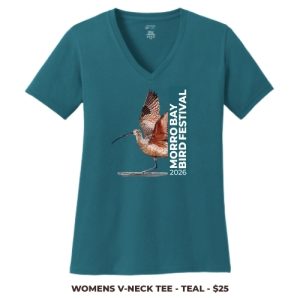
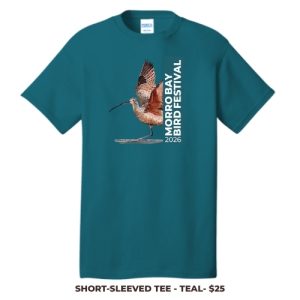
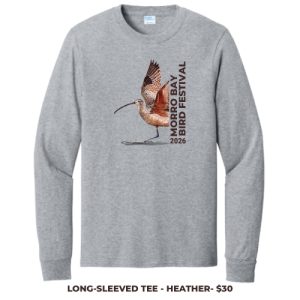
These items are available during the registration process until December 1, 2025. Pick up your pre-ordered items during the festival at the Check-in Desk located at the Morro Bay Bird Festival HQ (Morro Bay Community Center -1001 Kennedy Way, Morro Bay).
| Item | Shirt Color | Description | Sizes | Size Chart | Price |
|---|---|---|---|---|---|
| Women's V-necked Short Sleeved Tee | Teal | 5.4-ounce, 100% cotton; contoured body for a feminine fit. | XS - 4XL* | Sizing Chart | $25 |
| Unisex Short-Sleeved Tee | Teal | 6.1-ounce, 100% soft spun cotton. | S - 4XL* | Sizing Chart | $25 |
| Unisex Long-Sleeved Tee | Heather | 5.3-ounce, 100% garment-dyed combed ring spun cotton. | S - 4XL* | Sizing Chart | $30 |
* 4XL tees available only during pre-order.
Click here to view items sold during the festival at the festival sales table in the Marketplace.
The registration desk is at the Morro Bay Community Center, 1001 Kennedy Way.
| REGISTRATION | CHECK-IN | |
| Wednesday | 3 pm - 6 pm | 3 pm - 6 pm |
| Thursday | 6 am - 5 pm | 6 am - 5 pm |
| Friday | 6 am - 5 pm | 6 am - 5 pm |
| Saturday | 6 am - 5 pm | 6 am - 5 pm |
| Sunday | 6 am - 2 pm | 6 am - 2 pm |
| Monday | 6:45 am - 9 am | See Registration Desk |
REGISTRATION TIPS
Visit the event schedule page to plan your itinerary for the Morro Bay Bird Festival in advance of registration. Each trip has a three-digit number (found in the program information and schedule) to help you find the trip you’re looking for during registration more quickly. 1xx denotes a Thursday event, 2xx denotes a Friday event, 3xx a Saturday event, 4xx a Sunday event and 5xx a Monday event. Your pass price will be automatically assigned based on the number of days you have selected trips.
We recommend registering for your highest-priority trips first to have the best chance of securing them. Make sure to also plan multiple alternate choices for each trip, as many fill very quickly.
We are processing payments through PayPal but you do not need a PayPal account to pay for your registration. When you arrive at the PayPal payment screen, simply click the gray box at the bottom of the screen that says “Pay with Debit or Credit Card.”
HOW TO REGISTER A GROUP
To begin, enter the basic information for the person who will pay (if you register as a group, you must pay with a single credit card). Then select how many additional people will be registered in this group (up to 3 in addition to the payer) and enter their basic information. If possible, enter a unique email address for each additional person. This will allow them to view their own unique itinerary in our Bobolink app. If you would rather view all of your group’s itineraries in your Bobolink account, no need to do so.
On the next screen, select a day, and then an event on that day. Select (check) all the people in your group who want to go to that event and click Register/Add to Cart.
IMPORTANT: Pay close attention to the message for each attendee after clicking Register/Add to Cart. If the event is full, there will be a red error message and the trip will not be added to your registration summary at the bottom of the screen.
Repeat this process until all events are added to your registration summary at the bottom of the page.
CONFIRM YOUR REGISTRATION
After registering, you will be sent a confirmation email (one per group). The confirmation email will include a link for you to review your itinerary. Be sure to carefully review the itinerary for each person in your group. Please check your junk mail or spam folders if you do not see an email right away. If there is a problem with your registration, please email us at support@morrobaybirdfestival.org, or call 1-805-600-2147.
TROUBLESHOOTING
Registration will begin at 8:00 am PDT on Saturday, November 1, 2025. The most common problem people encounter is that they can't see the link to the registration site. If you don't see a link to register, make sure you force refresh your browser. For Windows users, this is CTRL + F5 (F5 button at the top of the keyboard). For MAC users this is APPLE + R or COMMAND + R.
REGISTRATION PROCESS (4 STEPS) (this information comes directly from our registration software Signup Master)
Step 1) List all the people who will register on this invoice (up to 4 people total)
Step 2) Select events as quickly as possible. After the events are chosen, move on to steps 2.2, then 3 and 4 knowing your events are "locked in" for 30 minutes.
- Select a day.
- Select an event on that day.
- Select (check) all the people in your group who want that day/event.
- Click the Register/Add to Cart button below the Attendees list.
- Repeat until all day/event/registrant combinations are added to the Summary at the bottom of the page. You may return to this page using the ‘Previous’ button if you want to revise the events.
- Click Next >> to go to the Box Lunch selection.
Step 2.1) Select Merchandise
- T-Shirts: T-Shirts when pre-ordered are guaranteed to be available in the size selected. Festival shirts will also be on sale at the festival in limited quantities. T-shirts are not included with your registration fee. For each attendee, please select the option of purchasing a t-shirt by clicking on attendee’s name and select the desired size. If you are in doubt as to size, we recommend a larger size.
All of the items above may be ordered multiple times; the process to do so is:
- Select the item you want.
- Select the attendees who want it.
- Click the Add to Cart button below the Attendees list.
- Repeat until the correct number of items have been purchased for all attendees.
Step 3) Attendee Contact Information The system automatically assigns the correct Festival admission fee based on your selected events. If you have not completed through the payment step within 30 minutes, the system will clear your registration and you will have to start over.
At this step you should have selected all available Festival Events for ALL attendees in your group. If you want to select any additional Festival Events, click in the "<< Previous" button and complete your selection.
To view the list of all selected Festival Events, click on the "<< Previous" button and review the Registration Summary section at the bottom of the page.
- Please complete the required Contact Information for all Attendees in your group. If possible, include a different email address for each registrant to optimize the use of our Bobolink App.
- When completed click the Next >> button to continue to the Payment page. The system will automatically calculate the festival fees for each individual based on selections made. (see festival fees)
Step 4) Select payment method
- Review your registration invoice summary at the bottom of this page.
- Review the terms and conditions and check the box if you agree.
- Select the form of payment
- Click Submit Registration. You will be taken to a new page where you can print a copy of the invoice summary.
We are processing payments through PayPal but you do not need a PayPal account to pay for your registration. When you arrive at the PayPal payment screen, simply click the gray box at the bottom of the screen that says “Pay with Debit or Credit Card.”
Cancellation and Refund Policy
Cancellations made on or before midnight December 29, 2025, will result in a refund of fees paid, less $50 administrative fee for each registrant. Refunds will be processed by the Registrar after the festival. No refunds will be made for cancellations after December 29, 2025, or for no-shows.
Morro Bay Bird Festival reserves the right to cancel any event for any reason. You will receive a full refund for any paid event we cancel.